Locations
Find free and almost empty spots in your storage, read from the numbered location codes on your lots.
Inventory → Locations reads the storage locations on your lots and shows which numbered spots are free and which are almost empty. Use it to find a place for new stock or to see which drawers to combine. The page only reads your locations: nothing changes in BrickInvoice or on your stores. It works once your import is approved.
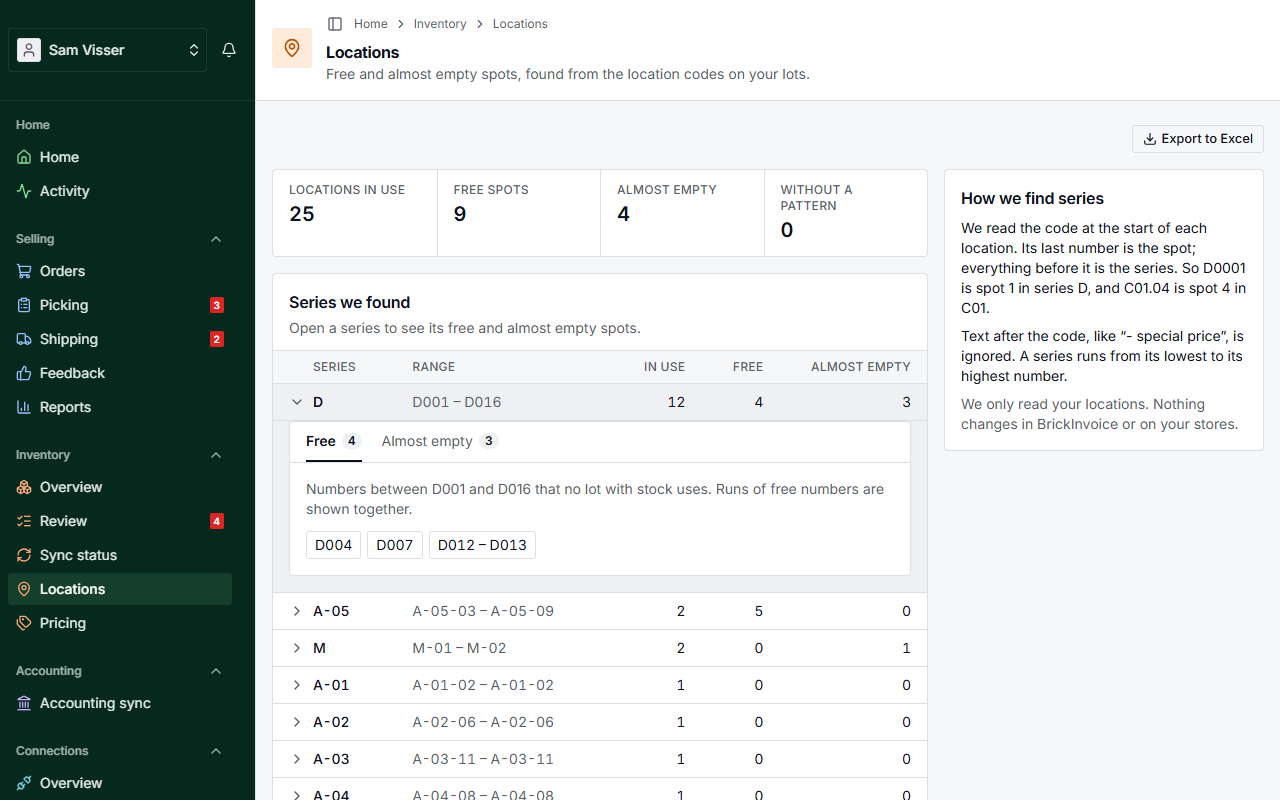
Table of Contents
How series are found
BrickInvoice reads the code at the start of each location. Its last number is the spot, and everything before it is the series. So D0001 is spot 1 in series D, and C01.04 is spot 4 in series C01. Text after the code, like - special price, is ignored. Locations that are only a number, like 0412, form the series Numbers only.
A series runs from its lowest to its highest number. A single number far away from the rest, like a typo, does not stretch the range.
Totals
At the top you see Locations in use, Free spots, Almost empty and Without a pattern.
Below that, Series we found lists each series with its Range, how many spots are In use, how many are Free and how many are Almost empty. The largest series come first. Show all … series lists every one. Click a series to open it.
Free spots
The Free tab of an open series lists the numbers between its lowest and highest spot that no lot with stock uses. Runs of free numbers are shown together, like D0120 – D0135.
A spot that only a sold-out lot still names counts as free. It is marked empty lot kept, because that lot keeps its location for when you fill it up again.
Almost empty spots
The Almost empty tab lists the spots with little left, the emptiest first, with the lots that lie there. By default that is at most 2 pieces. Change it with At most: a number up to 99, and pieces or lots. Then choose Apply.
Locations without a pattern
Some locations have no number, or numbers too far apart to be a numbering, like set numbers. They are counted under Without a pattern, and a card lists the first ones with their number of lots.
When none of your locations is numbered, the page says We found no numbered locations. When your lots have no location at all, it says so too.
Export to Excel
Export to Excel downloads every series, every free spot, the almost empty spots (with the threshold you set) and the locations without a pattern, each on its own sheet. The page shows a limited number of rows per list. The file has them all.