Billing
The plans and their prices, the free trial, changing or cancelling your plan, and your invoices.
Without a plan you can use the free seller tools, and BrickInvoice still fetches your orders and shows your reports. A plan adds the accounting sync: every order booked in your accounting package. You manage your plan under Settings → Billing.
Table of Contents
- The plans
- How often orders are fetched
- The free trial
- Choosing a plan
- Your plan and usage
- Changing or cancelling
- Invoices
- The inventory sync fee
The plans
Prices are in euros and billed monthly.
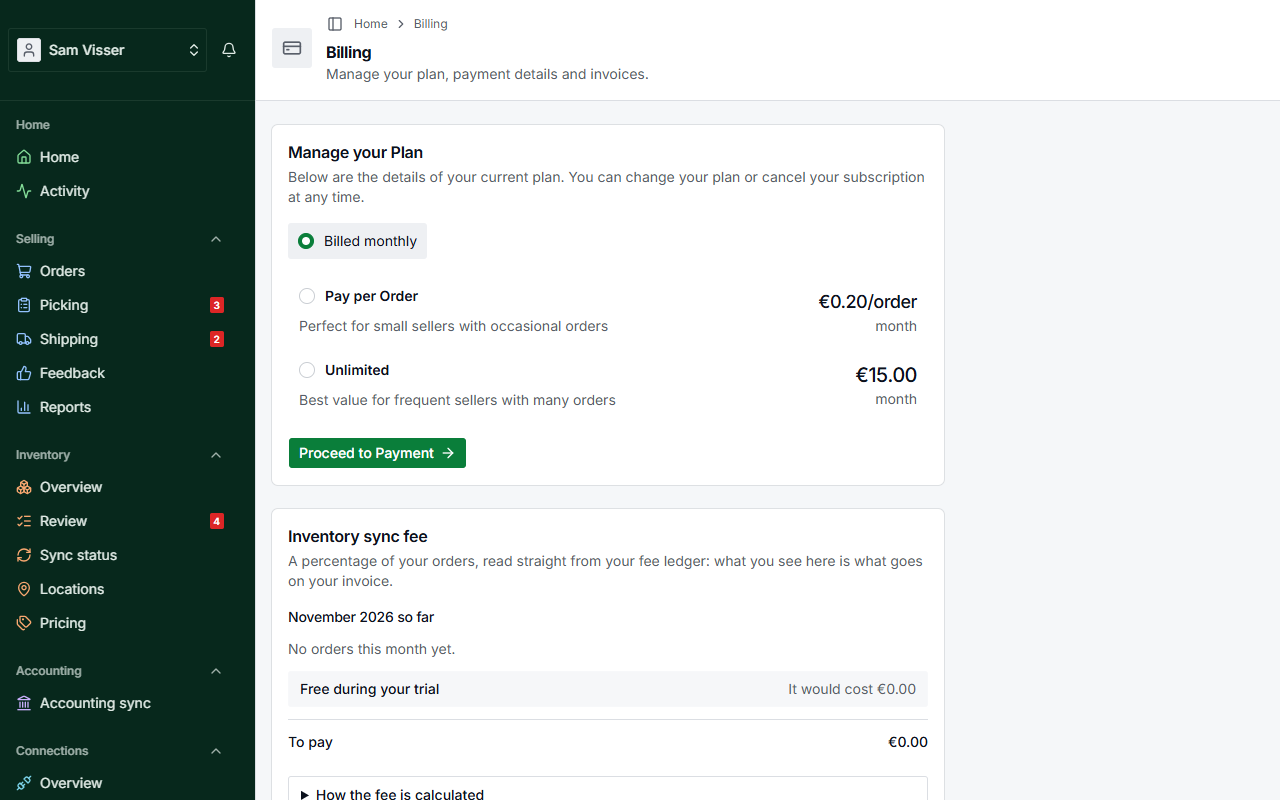
- Pay per Order: €0.20 for each order booked in your accounting during the billing period. Orders are fetched every 24 hours.
- Unlimited: €15.00 a month for as many orders as you like. Orders are fetched every 6 hours.
Pay per Order costs less as long as you book fewer than 75 orders a month. From 75 orders on, Unlimited costs the same or less.
With Pay per Order, a billing period that comes to less than €2.50 is not charged. The amount moves to the next period and is added to that invoice.
How often orders are fetched
How often BrickInvoice fetches your orders from BrickLink and Brick Owl depends on your plan:
- without a plan, and with Pay per Order: every 24 hours
- with Unlimited, and during the free accounting trial: every 6 hours
Connections → Schedules shows the frequency, when orders were last fetched and when the next fetch is.
The free trial
A new account can try the accounting sync for free: the first 25 orders are booked without a plan, and no card is needed. Home shows how many of the 25 you have used.
When the 25 orders are used up, the accounting sync pauses. Connections → Schedules then shows Trial Limit Reached with Upgrade Plan. New orders are still fetched; they wait and are booked once you choose a plan. Everything you already booked stays in your accounting package.
Choosing a plan
Without a plan, the billing page shows the card Manage your Plan:
- Pick Pay per Order or Unlimited. Below the list you see what the plan costs and what it includes.
- Click Proceed to Payment. The payment form opens on the same page.
- Fill in your payment details and confirm. For Unlimited you can enter a discount code in the payment form.
Your plan and usage
With a plan, the billing page shows:
- Your Plan: the plan's name and its status, such as Active, Past Due or Canceled. If your subscription is set to end, it says on which date.
- Current Period Usage (Pay per Order): Orders Processed with the price per order, Current Period Cost, the Carryover Amount from earlier periods, and the Billing Period.
- Manage your Billing Details, with the button Visit Billing Portal.
Changing or cancelling
Click Visit Billing Portal under Manage your Billing Details. In the billing portal you can update your payment details, change your plan or cancel it.
When you cancel, your plan keeps running until the end of the billing period. The billing page shows Subscription Cancelled and the date it ends. After that the accounting sync stops, and Connections → Schedules shows Active Subscription Required. Your orders are still fetched.
If you start a plan again later, set a new cutoff date first: the red banner Cutoff Date Reset Required on Settings → Profile, tab Tax & Business, asks for one within the last 7 days. See Configure your settings.
Invoices
Your invoices are in the billing portal. Click Visit Billing Portal on the billing page to see and download them.
The inventory sync fee
The inventory sync has its own plan, which also includes the accounting sync. It is not in the list under Manage your Plan.
The fee is 1.5% of the order totals of the month, with a minimum of €2.50 and a maximum of €250 a month. Orders are fetched every 6 hours, and every few minutes while the inventory sync runs.
- The basis is the order total as the buyer paid it: goods, shipping, handling and VAT.
- Months run in UTC, so an order placed just after midnight on the 1st in the Netherlands still counts for the month before.
- A cancellation is taken off in the month it happens, not in the month of the order. A partial refund takes only the refunded goods off; the shipping stays.
- In a month you have the plan for only part of the time, the minimum and maximum are prorated to those days. Your trial days do not count.
- A month with more cancelled than new orders still pays the minimum, and the difference is kept as credit for the next month.
Accounts with the inventory sync see an Inventory sync fee card on the billing page: what the month has cost so far, the orders and the basis, what you would pay if the month closed now, and the closed months with their invoices. During the trial it shows Free during your trial and what the month would have cost.