Pricing with rules
Price rules set your lot prices from market data. You always see every new price before anything changes.
Price rules set the price of your lots from what the market does: what sold, what is for sale, and how fast it moves. A rule never changes a price by itself. A round collects your lots, fetches the market data they need, calculates the new prices and shows them to you. Only when you confirm the preview do the new prices go to your stores.
Table of Contents
- How it works
- A rule
- The examples worked out
- The order of the rules
- No data and limits
- Depending on a market figure
- Recipes
- The market figures
- A round
- The preview
- Prices per sales channel
How it works
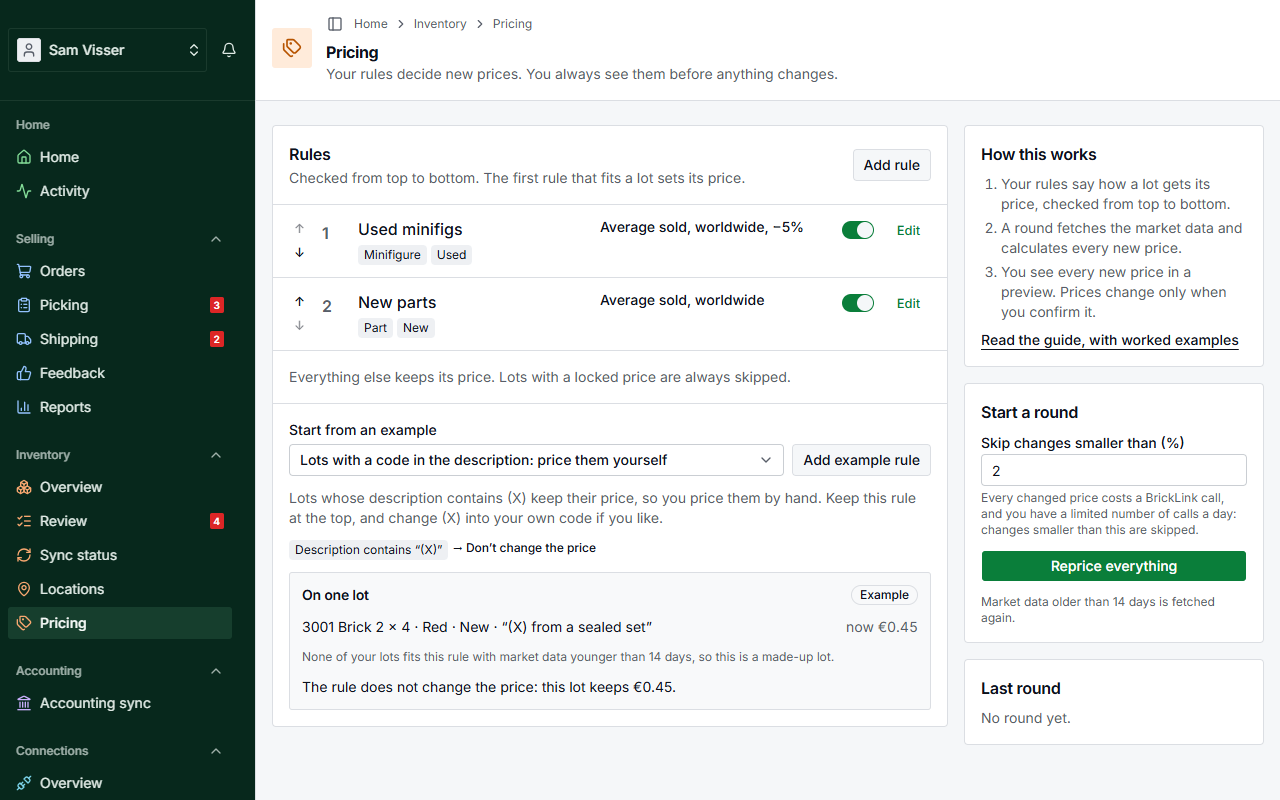
- Your rules say how a lot gets its price. They are checked from top to bottom: the first rule that fits a lot sets its price. A lot that no rule fits keeps its price, and a lot with a locked price is always left alone.
- A round fetches the market data your rules need and calculates every new price.
- You confirm the preview. Only then do prices change.
Open Inventory → Pricing to see your rules. The menu item appears once your import is approved. Saving a rule changes no price. You can have up to 50 rules. To leave a rule out of the next rounds without deleting it, switch it off in the On column (or untick This rule is on in the rule).
A rule
A rule has:
- When: conditions that must all fit: the item type, new or used, completeness, color, the BrickLink category, the current price, a text in the description such as
(X), a market figure between two values, no market data, or a list of items. A rule without conditions fits every lot, and a rule takes at most 20 conditions. The list of BrickLink categories leaves out the ones that are only a year, such as "2019" (BrickLink files its catalogs per year there). For catalogs, use the item type. A rule that already names such a year keeps it. - Then: keep the price, or set it. To set it you choose the price to start from (for example what it sold for on average in the last 6 months), up to two prices to use if there's no data, a change by a fixed percentage or depending on a market figure, a price it may never go below and one it may never go above, and the rounding.
A name is optional. Without one, the list shows what the rule does, such as "Description contains “(50)” → Average sold, worldwide, −50%". That text always follows the rule, also after you change a setting. A name of your own stays as you typed it.
While you edit a rule, the panel On one lot shows one of your lots that fits the rule, with its price now and the price after each step. It calculates exactly as a round does, and follows every change you make. Another lot shows a different one. When none of your lots fits with market data younger than 14 days, it shows a made-up example lot, marked Example.
Brick Owl market data exists for minifigs only, so a rule that uses it needs the condition Item type is Minifig.
The examples worked out
Under Start from an example on the Pricing page, Add example rule adds one of these rules, without a name, for you to adjust. Before you add it, the page shows what it does with one lot.
The lots below use these market figures. Prices from BrickLink are in euros as a buyer sees them. Brick Owl prices are in pounds and are converted at the exchange rate of the round (here £0.85 to the euro).
| Lot | Now | Sold, 6 months, average | For sale now, average | Pieces sold, 6 months | Pieces for sale |
|---|---|---|---|---|---|
| 3001 Brick 2 x 4, Red, used | €0.30 | €0.42 | €0.47 | 700 | 250 |
| 3001 Brick 2 x 4, Red, new | €0.45 | €0.62 | €0.71 | 1,500 | 2,400 |
| sw0001a Luke Skywalker, used | €2.10 | €2.30 | €2.80 | 95 | 70 |
The minifig also sold on Brick Owl for £1.85 on average in the last 6 months.
Lots with a code in the description
When the description contains (X) → Then don't change the price.
The new brick with the description "(X) from a sealed set" keeps €0.45, whatever the market does. Use your own code if you like. Keep this rule at the top (see the order of the rules).
Damaged lots at half price
When the description contains (50) → Then average sold, worldwide, −50%, rounded to the cent.
The used brick with the description "(50) scratch on the side":
| Step | Price |
|---|---|
| Now | €0.30 |
| Average sold, worldwide | €0.42 |
| −50% | €0.21 |
| To the cent | €0.21 |
A brick without (50) in its description does not fit this rule, and goes on to the next one.
Follow the sale price
When every lot → Then average sold, worldwide.
The new brick goes from €0.45 to €0.62, the used one from €0.30 to €0.42.
Follow what other shops ask
When every lot → Then average for sale, worldwide.
The new brick goes from €0.45 to €0.71: what shops ask for it now, on average.
Dearer when it sells fast
When the sell-through is 70% or more → Then average sold, worldwide, +10%.
Sell-through is the share of pieces that sold, out of what sold plus what is still for sale. The used brick: 700 sold and 250 for sale, so 700 ÷ 950 = 74%. It fits: €0.42 + 10% = €0.462, rounded to €0.46.
The new brick: 1,500 ÷ (1,500 + 2,400) = 38%. It does not fit, and goes on to the next rule.
Minifigs from Brick Owl sales
When the item type is Minifig → Then Brick Owl average sold, 6 months. If there's no data, BrickLink average sold, worldwide.
The Luke Skywalker sold for £1.85 on Brick Owl: £1.85 ÷ 0.85 = €2.176, rounded to €2.18. Without Brick Owl sales, the rule uses the BrickLink average sold instead: €2.30. The panel on the rule says when that happened ("No data for Brick Owl average sold, 6 months, so: Average sold, worldwide"), and the preview of a round marks such a price as a fallback.
The order of the rules
The first rule that fits a lot sets its price, so a rule for a few lots goes above a rule for all of them. Move a rule with the arrows.
What goes wrong when the code rule is at the bottom:
| # | Rule |
|---|---|
| 1 | Every lot → average sold, worldwide |
| 2 | Description contains (X) → don't change the price |
The new brick marked "(X) from a sealed set" fits rule 1 first. It gets €0.62 instead of keeping €0.45, and rule 2 never comes into play. Move the (X) rule to the top and the lot keeps its price.
No data and limits
If there's no data, use. A rule can name up to two prices to try, in order, when the first one has no data. Example: start from average sold, worldwide. If there's no data, average for sale, worldwide. A brick that did not sell in 6 months, with shops asking €0.47 for it on average, gets €0.47. With no data at all, the lot keeps its price.
Never below. An amount, or a market price plus or minus a percentage. Example: the damaged-lots rule with "never below €0.25" and rounding to 5 cents:
| Step | Price |
|---|---|
| Now | €0.30 |
| Average sold, worldwide | €0.42 |
| −50% | €0.21 |
| Never below €0.25 | €0.25 |
| To 5 cents | €0.25 |
Never above. Example: average sold, worldwide, never above the lowest offer for sale now. The Luke Skywalker sold for €2.30 on average, but the cheapest offer now is €1.60: it gets €1.60.
When "never below" lies above "never above", "never below" wins: your minimum is never undercut. Rounding never goes below it either.
Rounding comes last: to the cent, to 5 or 10 cents, or to a price ending in .99 (at least €0.99). No rounding keeps the price as calculated. €0.462 to 5 cents is €0.45. €2.18 ending in .99 is €1.99.
Depending on a market figure
Instead of a fixed percentage, the change can depend on a market figure. You give two points, and in between the change goes up in a straight line. Below the first point and above the second it stays the same.
Example: average sold, worldwide, from −10% at a sell-through of 20% to +10% at 100%. For a part that sold for €0.50 on average:
| Sell-through | Change | Price |
|---|---|---|
| 10% (below the first point) | −10% | €0.45 |
| 20% | −10% | €0.45 |
| 60% | 0% | €0.50 |
| 100% | +10% | €0.55 |
At 60%, halfway between 20% and 100%, the change is halfway between −10% and +10%.
Recipes
I never want to go below an amount. Give each rule that sets a price "never below", for example €0.05. A limit belongs to its rule: a rule without one has none.
Only used parts. Two conditions: Item type is Part, and New or used is Used. A new part or a used minifig does not fit and goes on to the next rule.
Minifigs differently from parts. A rule for minifigs above a rule for everything else:
| # | Rule |
|---|---|
| 1 | Item type is Minifig → Brick Owl average sold, 6 months. If there's no data, average sold, worldwide |
| 2 | Every lot → average sold, worldwide |
Minifigs stop at rule 1. Everything else gets rule 2.
The market figures
Each BrickLink figure can be worldwide, for a region or for one country. Europe is every European country, the UK, Switzerland and Norway too. The EU is the 27 member states only. Brick Owl figures are always worldwide.
| Figure | What it is |
|---|---|
| Average sold | What it sold for on average in the last 6 months, per sale. Sales at €0.40, €0.50 and €0.60: €0.50. |
| Average sold per piece | The same per piece: a sale of 100 pieces counts 100 times. Lower than the average sold when big lots sell cheaper. |
| Lowest and highest sold | The cheapest and the dearest sale in the last 6 months. |
| Last sale | The price of the most recent sale. Only known worldwide. |
| Average for sale | What shops ask now, on average per lot. |
| Average for sale per piece | What shops ask now, on average per piece. |
| Lowest and highest for sale | The cheapest and the dearest offer now. |
| Pieces sold, sales | How many pieces sold in the last 6 months, and in how many sales. |
| Pieces for sale, lots for sale | How many pieces are for sale now, and in how many lots. |
| Sell-through | Sell-through 70%: of every 10 pieces, 7 were sold in the last 6 months and 3 are still for sale. High means it sells faster than it is offered. |
| Months of supply | Months of supply 3: what is for sale now lasts 3 months at the pace it sold in the last 6 months. Low means it is scarce. |
| Brick Owl average sold, 6 months and 2 years | What it sold for on Brick Owl. Two years is steadier, but slower to follow the market. |
| Brick Owl average for sale, lowest offer | What shops on Brick Owl ask now. |
| Brick Owl price trend | Trend 1.2: in the last 6 months it sold for 20% more than on average over 2 years. Below 1: it got cheaper. |
| Brick Owl asking vs sold | Asking vs sold 1.5: shops ask 50% more than it sold for in the last 6 months. Far above 1: offers are dearer than what sells. |
| Brick Owl pieces for sale, lots for sale | How many pieces are for sale on Brick Owl now, and in how many lots. |
| Brick Owl pieces per lot | Pieces per lot 4: each lot for sale on Brick Owl has 4 pieces on average. |
| Brick Owl used share | Used share 80%: of every 10 pieces for sale on Brick Owl, 8 are used and 2 new. |
A round
Choose Reprice everything on the Pricing page, or select lots in the overview and choose Reprice selection. With Reprice everything you set the smallest change that counts in Skip changes smaller than (%), 2% by default: every changed price costs a call to BrickLink, and you have a limited number of calls a day, so tiny changes are skipped. Reprice selection always skips changes under 2%.
Only one round can be open at a time. While one is open, the Pricing page shows A round is open with View the round. Finish or stop it before you start another. A BSX upload that is being priced with your rules also holds off a new round until the upload is added or cancelled. Once a round is done, Last round shows when it was confirmed and how many prices changed or were skipped.
The round then:
- Collects the lots. Locked lots are skipped. The same part in several lots is fetched once.
- Fetches BrickLink market data that is missing or older than 14 days. Brick Owl data is not fetched by a round: BrickInvoice keeps it up to date by itself. BrickInvoice uses at most part of your daily BrickLink budget for this, so your orders keep syncing. When the budget is used up, the round waits and goes on by itself. A large first round can take days.
- Calculates the new prices once everything is in.
- Shows the preview and waits for you. You get a notification.
Stop this round ends it without changing a price, until you confirm the preview.
The preview
The preview lists every lot whose price changes: the price now, the new price, the rule, what it is based on and how old that data is. A price from Brick Owl links to the minifig on Brick Owl. Per channel shows what each store gets: the new price with that channel's factor, currency and rounding, or the lot's own price there (see Prices per sales channel). If you use Shopify, it shows the price from your Shopify price card, and applying the round changes it there too. Filter by rule, and click Lot, Now, New or Change to sort: the first click puts the highest first (for Change the biggest rise), a second click the lowest (the biggest drop). The page numbers under the table take you straight to any page. Untick a line, or every line of a rule, to keep that price. The other tabs show what was skipped: under the threshold, Kept by a rule, Price locked, In Review, No market data, and No rule for lots that no rule fits. Discard round ends the round without changing any price.
The bar below says how many changes are selected and over how many days they are sent. Apply N price changes sends them. That confirmation also counts for the safety brake, so the changes are not held again. A lot whose price you changed yourself since the round started keeps your price.
Prices per sales channel
Under Inventory → Sales channels each channel shows its price: your lot price times its factor, in its currency, rounded as you choose. BrickLink and Brick Owl show that price as it is to EU buyers and handle VAT themselves. The import store carries your base price, so its factor stays 1. For the other store, the import suggests a factor from how your prices there compared. A factor lies between 0.5 and 2: 1.05 makes that channel 5% dearer than your lot price.
Changing a factor or the rounding sends nothing straight away. When lots get another price on that channel, you see how many and how many calls it takes, and confirm. The settings are saved once every new price is sent. A lot with its own price on that channel keeps it.